
Ready to turn your ideas into a captivating ebook for KDP publishing? In a world where digital content reigns, having the right ebook creator is like wielding a magic wand – it can effortlessly transform your thoughts into beautifully crafted digital books. Whether you’re a budding writer or a seasoned pro, there’s a perfect tool out there to suit your unique needs.
From free, user-friendly platforms to professional-grade software, our compilation of 9 top ebook creators will navigate you through the diverse array of options. So, let’s dive in and uncover the tool that will elevate your ebook from good to great!

Adobe InDesign stands out as the go-to software for professional ebook creators. Known for its advanced layout and design capabilities, it offers unparalleled control over every aspect of your ebook’s appearance. From intricate typography to sophisticated image handling, InDesign is equipped to handle complex designs with precision.
InDesign excels in format versatility, supporting a wide range of ebook formats. It’s particularly strong in exporting to EPUB, an ebook standard, and interactive PDFs, ideal for rich, media-heavy ebooks. This makes it a top choice for creating ebooks that are both visually stunning and functionally robust.
InDesign is best suited for those with some design experience or those willing to climb the learning curve. You can start from scratch or use one of the many templates available. Its comprehensive toolset allows for detailed customization, making it possible to bring even the most complex designs to life.
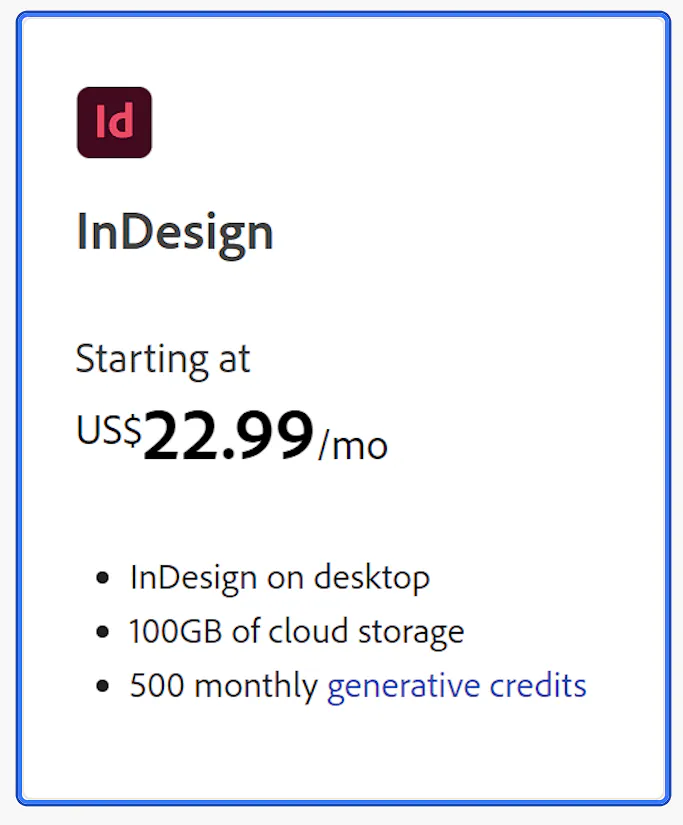
Adobe InDesign operates on a subscription model, which might be a consideration for those on a budget. However, its professional-grade features justify the investment for serious ebook creators.
Click HERE for current pricing.
Choose Adobe InDesign if you’re aiming for top-tier professional quality in your ebook creator. It’s ideal for creators who need advanced design capabilities and are willing to invest time and resources into creating a truly standout ebook.

Sqribble is a game-changer for ebook creation, harnessing the power of AI to simplify the design process. It offers a unique blend of automated content generation and customizable templates, making it ideal for those who want to create professional-looking ebooks quickly and efficiently. Its intuitive interface allows for easy customization of layouts, styles, and colors.
Sqribble primarily focuses on exporting ebooks in PDF format, which is widely accepted and easy to share. This format is suitable for a variety of ebooks, including guides, manuals, and storybooks, ensuring a broad appeal.
With Sqribble, you can start by selecting a template that fits your ebook’s theme. Then, utilize its AI-driven content suggestions to fill your pages, or input your own text. The software’s drag-and-drop editor makes it simple to add, remove, or modify elements, streamlining the ebook creation process.
Sqribble offers a one-time purchase, which can be more cost-effective than subscription-based models. This pricing structure makes it an attractive option for those who prefer a straightforward, one-time investment in an ebook maker.
Click HERE for the current price.

Sqribble is the perfect choice for creators looking for a balance between ease of use and professional output. Its AI-driven features are particularly beneficial for those who want to speed up the ebook creation process without compromising on quality.

Canva isn’t just for social media graphics; it’s a powerhouse for ebook creation too. With its drag-and-drop interface, you can easily bring your ebook to life, even if you’re not a design pro. It boasts a vast library of templates, images, and fonts, making it a breeze to create professional-looking ebooks. Plus, its image editing capabilities let you add that extra flair to your visuals.
One of Canva’s strengths is its flexibility in formats. You can export your masterpiece in various formats, including PDF, EPUB, and more, ensuring your ebook looks great on any device.
Start by choosing a template or building your design from scratch. Canva’s intuitive tools allow you to customize every element, from layout to typography. You can add your own images or choose from Canva’s extensive library. Once your design is complete, simply choose your desired format and download your ebook.
Canva offers a free version that’s surprisingly robust, perfect for those just starting out. For more advanced features, Canva Pro provides additional functionality at a reasonable price.
Click HERE for current pricing.
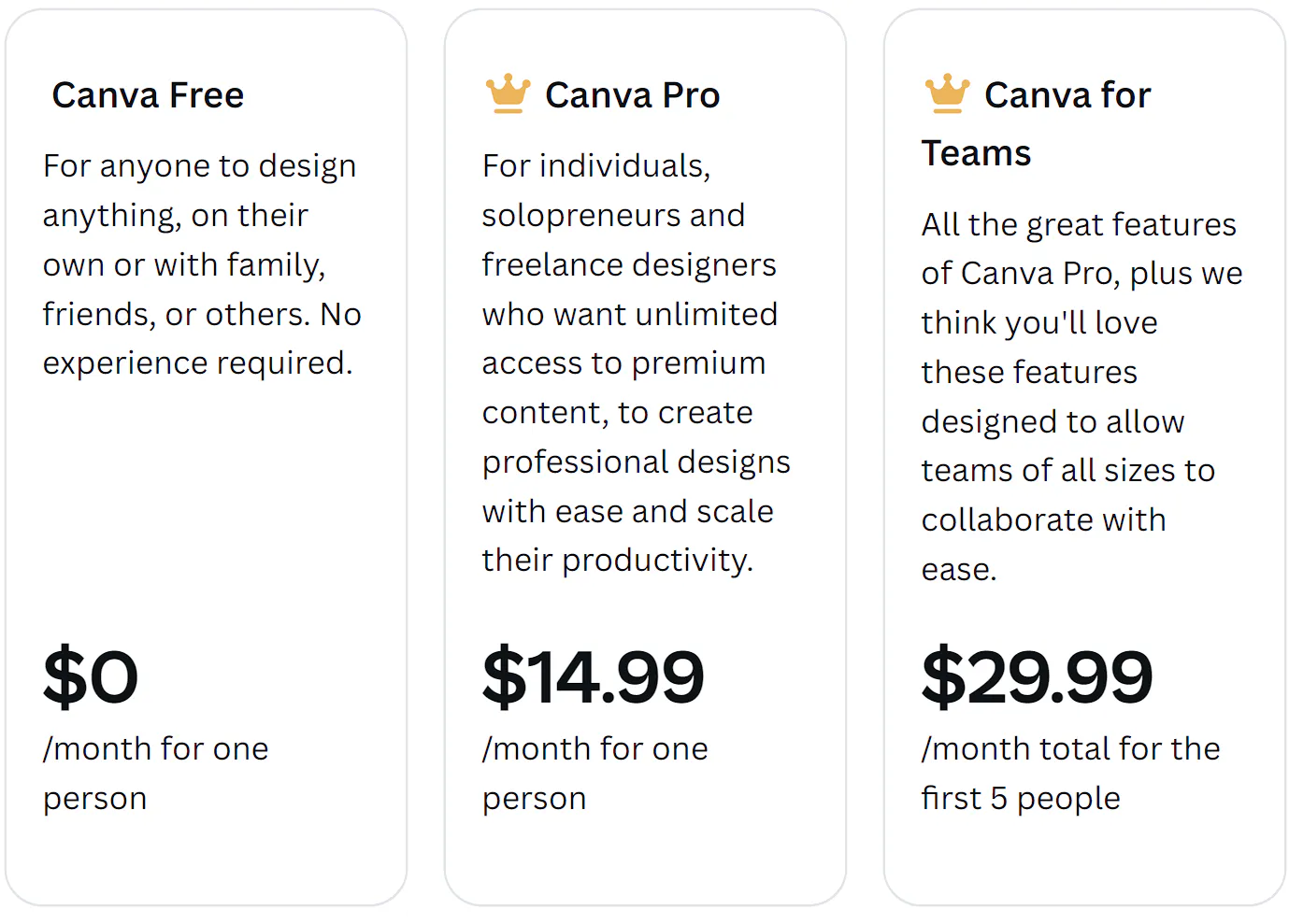
If you’re after a tool that balances ease of use with professional results, Canva is your go-to. It’s perfect for creators who want to focus more on content and less on wrestling with complex design software.
Google Docs may seem like a simple word processor, but it’s a hidden gem for ebook creation. Its real power lies in its simplicity and collaboration features. You can easily draft and edit your ebook with real-time collaboration from anywhere in the world. Plus, its seamless integration with other Google services adds to its convenience.
While Google Docs isn’t typically recognized for diverse format exports, it covers the essentials. You can export your documents in PDF, which is widely used for ebooks. It also supports exporting to DOCX and RTF, useful for further editing or formatting in other software.
Begin by writing your content directly in Google Docs. Utilize its robust editing tools to format your text and add images. Once your content is ready, you can export it in PDF format for a universally accessible ebook. Google Docs is particularly advantageous for collaborative projects, allowing multiple contributors to work simultaneously.
The best part about Google Docs is that it’s completely free. All you need is a Google account, making it an accessible option for anyone starting in the ebook world.
Google Docs is ideal for those who prefer a straightforward, no-frills approach to ebook creation. It’s especially beneficial for collaborative writing projects and for creators who need a reliable, easily accessible platform.

Designrr is a boon for those who want to create professional-looking ebooks without deep design expertise. It stands out with its user-friendly interface, diverse range of templates, and the unique ability to import content directly from websites, blogs, or Microsoft Word documents. This feature streamlines the ebook creation process, especially for repurposing existing content.
Designrr excels in its format versatility, supporting exports in PDF, Kindle format (MOBI), and EPUB. This range ensures that ebooks created with Designrr can be easily published and read across various platforms, from e-readers to standard digital devices.
Starting with Designrr is a breeze. Select a template that suits your project, import your content, and then dive into customizing your layout and design elements. The platform is designed to be intuitive, allowing for easy adjustments and additions, even for those new to ebook design.
Designrr offers a range of pricing options, including both one-time purchase and subscription models. This flexibility caters to different preferences and budgets, making it a versatile choice for various creators.
See latest pricing HERE
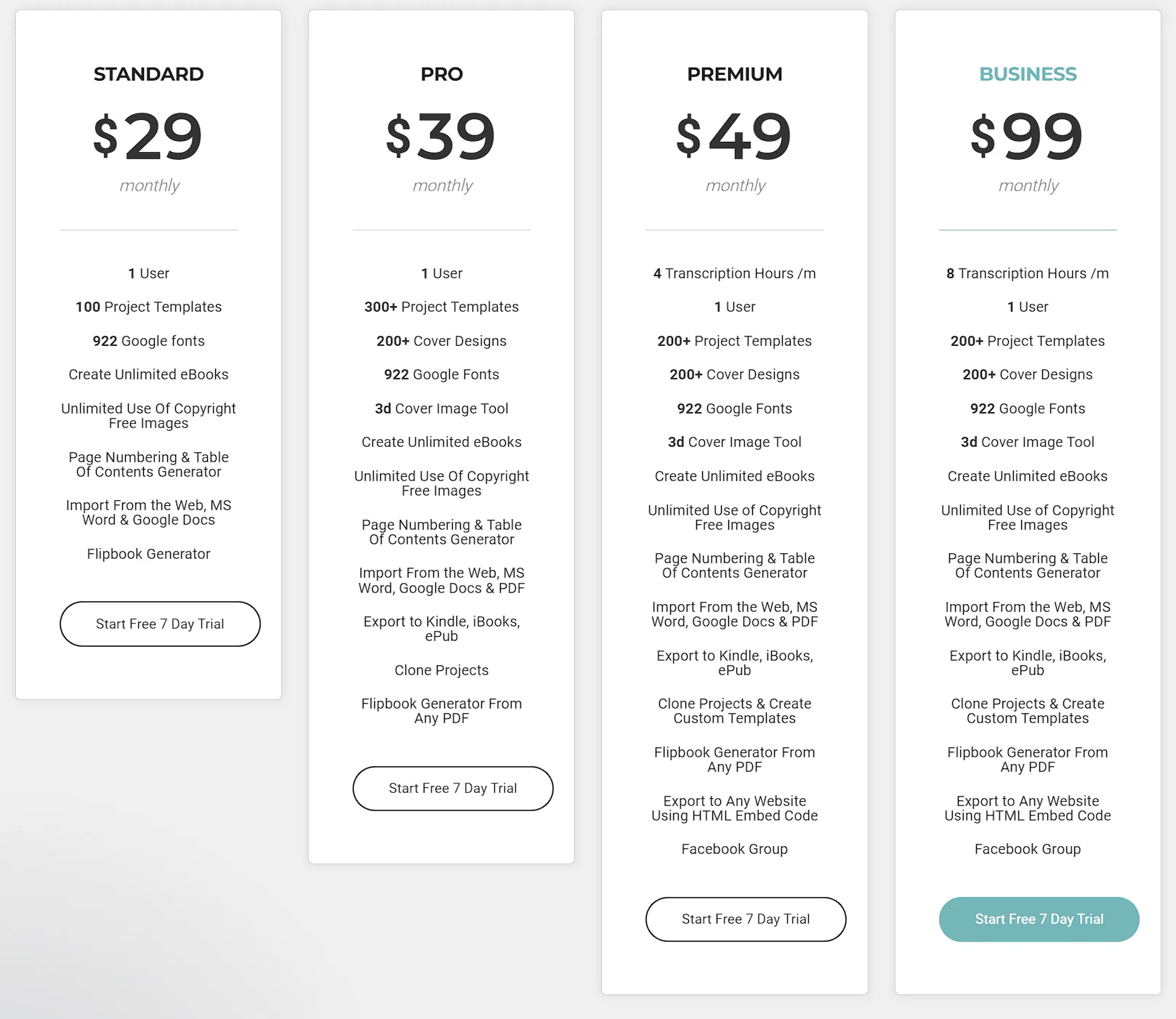
Designrr is the go-to ebook creator for content creators, marketers, and entrepreneurs seeking to produce sleek ebooks with minimal fuss. Its straightforward design process and ability to handle multiple formats make it a top pick for efficiently transforming content into polished, ready-to-publish ebooks.
Calibre is much more than just an ebook creator; it’s a comprehensive ebook management system. It’s known for its robust ebook library management, format conversion capabilities, and syncing features with various e-reader devices. Calibre also offers an in-built ebook viewer and editor, making it a versatile tool for both creation and organization of ebooks.
Calibre stands out for its wide-ranging format support. It can handle a plethora of formats including EPUB, MOBI, PDF, and many others. This makes it incredibly useful for converting ebooks into different formats for compatibility with various e-readers and devices.
Calibre’s ebook editor allows for detailed customization of your ebook. You can start from scratch or import an existing document and then edit it within Calibre. Its user interface might seem overwhelming at first, but it offers deep customization options for those who want full control over their ebook’s layout and formatting.
One of the best things about Calibre is that it’s completely free and open-source. This makes it an accessible option for anyone, regardless of budget.

Calibre ebook creator is ideal for those who are not only looking to create ebooks but also manage an existing collection. It’s particularly suited for users who need a tool that offers both creation and comprehensive management features, all in one place.

Vellum is a favorite among Apple users for its elegant and intuitive design interface. It’s specifically tailored for creating ebooks and print books with a professional, polished look. Vellum stands out for its ease of use, allowing authors to focus on their writing while it takes care of the formatting and design aspects.
Vellum is adept at exporting ebooks in formats that are widely accepted across major publishing platforms. It supports EPUB for a range of e-readers and also provides the option to create print-ready PDFs for physical copies of books.
Vellum’s user-friendly approach lets you import your manuscript and then effortlessly format it into a beautiful ebook. The software provides various style options to choose from, ensuring your ebook has a unique and professional appearance. Its preview feature allows you to see how your ebook will look on different devices, making adjustments a breeze.
Vellum is a premium software with a pricing model that reflects its specialized features and design capabilities. While it might be a significant investment, it’s a worthwhile one for Apple users looking for top-notch design quality in their ebooks.
Click HERE for latest pricing
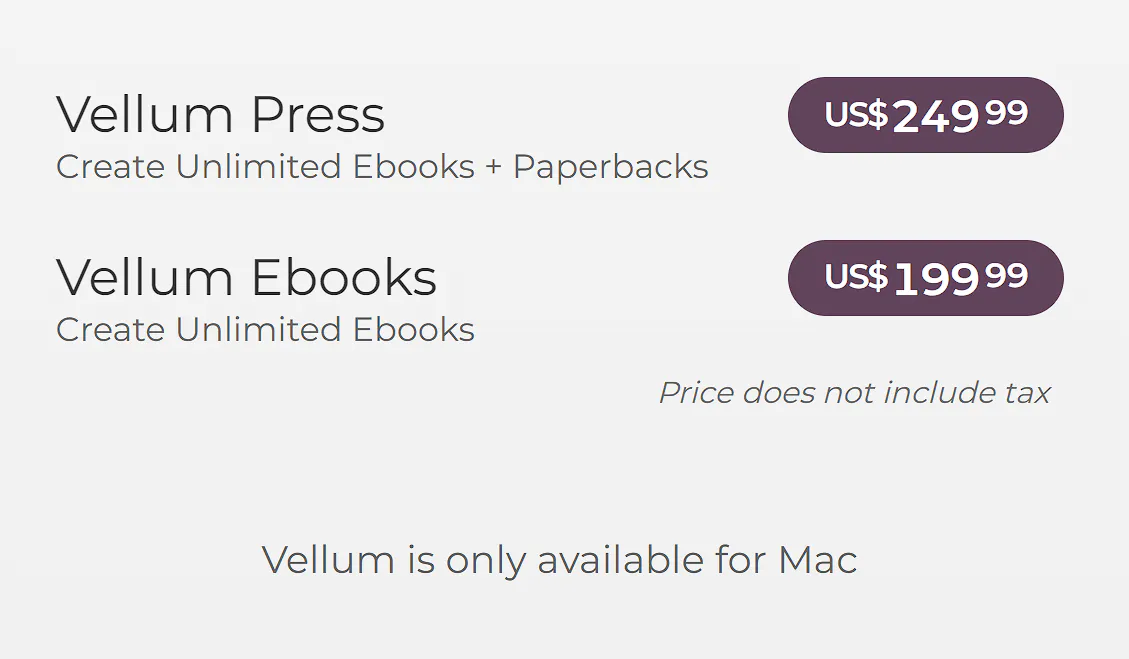
Vellum is the go-to choice for Mac users who want a seamless, straightforward ebook creation experience without compromising on the quality of the final product. It’s particularly appealing to authors who value design aesthetics and ease of use.

Ulysses is a dream come true for writers on Mac and iOS, offering a distraction-free environment and a suite of powerful features. Its clean interface keeps you focused, while the built-in proofreader and editing assistant ensure your writing is crisp and clear. The software excels in document management, making it easy to handle large projects. Additionally, its flexible export options allow for easy conversion of your text into PDFs, Word documents, and ebooks.
Ulysses supports exporting documents in PDF, EPUB, and DOCX formats, catering to a variety of publishing needs and platforms.
Ulysses is all about streamlined writing. Start your project with minimal setup, use markdown for easy formatting, and when ready, export your manuscript into a well-formatted ebook. Its goal-setting features help keep your writing on track.
Ulysses operates on a subscription model, offering a free trial for new users. This approach ensures continuous access to the latest features.
Click HERE for the latest pricing.
Ulysses is the perfect ebook creator for writers seeking a focused writing tool that also simplifies the ebook publishing process. It’s especially suited for Apple users who value a seamless, efficient writing experience.

Jutoh is an all-encompassing ebook creator designed for authors who desire extensive customization and control. It offers a broad spectrum of options for layout, styling, and content management, allowing for precise tailoring of every ebook element. Features like quick project setup, efficient editing, and support for complex formats make Jutoh a comprehensive choice for an ebook creator.
Jutoh’s strength lies in its wide-ranging format support. It can export to Kindle, ePub 2/3, ODT (for PDF creation), HTML, text, Markdown, CBZ, and MP3, covering a vast array of needs for various e-readers and publishing platforms.
Starting a new project in Jutoh is straightforward. Whether importing files or beginning anew, its powerful editing tools enable perfecting your ebook’s layout and content. Jutoh also offers advanced features like conditional content and interactive elements, enhancing the ebook creation experience.
Jutoh is available as a one-time purchase, offering a cost-effective solution for authors who prefer a simple, one-off pricing model over subscriptions.
See the latest pricing HERE
Jutoh is the go-to tool for authors seeking a flexible, feature-rich platform for ebook creation. It’s especially suited for those who require detailed control over design and formatting and for authors aiming to publish across a variety of formats and platforms.
Key features include versatile content import options, comprehensive management of your eBook library, elegant and user-friendly design interfaces, focused writing environments, and support for diverse file formats.
Yes, some eBook creation tools offer the ability to import content from blogs and websites, allowing you to repurpose them into eBook formats.
Yes, certain eBook maker tools are designed to handle large projects, offering features like chapter organization, manuscript editing, and format consistency.
While some tools offer both creation and publishing features, others specialize in either creation or market research and optimization for publishing.
There are free eBook creation tools available, though they might have limitations compared to paid versions.
Most eBook creation tools are designed with user-friendliness in mind, though some may have a learning curve. Many offer tutorials and support resources.
Some eBook tools support interactive elements like hyperlinks, but extensive interactivity may require more specialized software.