
What if you could find an email marketing service that’s not just affordable but also packed with powerful features and simple enough for anyone to use?
That’s the sweet spot Moosend aims to hit. Launched in 2011, this platform has been gaining traction among diverse groups like eCommerce stores, bloggers, publishers, and small businesses.
But the real question is, does Moosend fit the bill for your specific needs? With a sea of options out there, making the right choice can feel like finding a needle in a haystack.
To ease your decision-making process, we’ve put together a comprehensive Moosend review that covers all the bases. Let’s find out if Moosend is the email marketing ally you’ve been looking for.

| Moosend Features | Description |
|---|---|
| Drag & Drop Email Editor | Create professional-looking emails easily with no HTML knowledge required, using a user-friendly editor. |
| Email Marketing Automation | Set up high-converting automation workflows for various actions like user onboarding and abandoned carts. |
| Personalization | Utilize subscriber data for personalized emails, product recommendations, and hyper-personalization. |
| Analytics and Reporting | Track user actions and campaign performance with in-depth analytics to refine marketing strategies. |
| Integrations | Connect Moosend with favorite apps seamlessly for an integrated marketing approach. |
| Lead Generation Tools | Access advanced features like a landing page builder and subscription forms to grow your customer base. |
| Real-time Tracking | Monitor opens, clicks, social shares, and unsubscribes as they happen for immediate insights. |
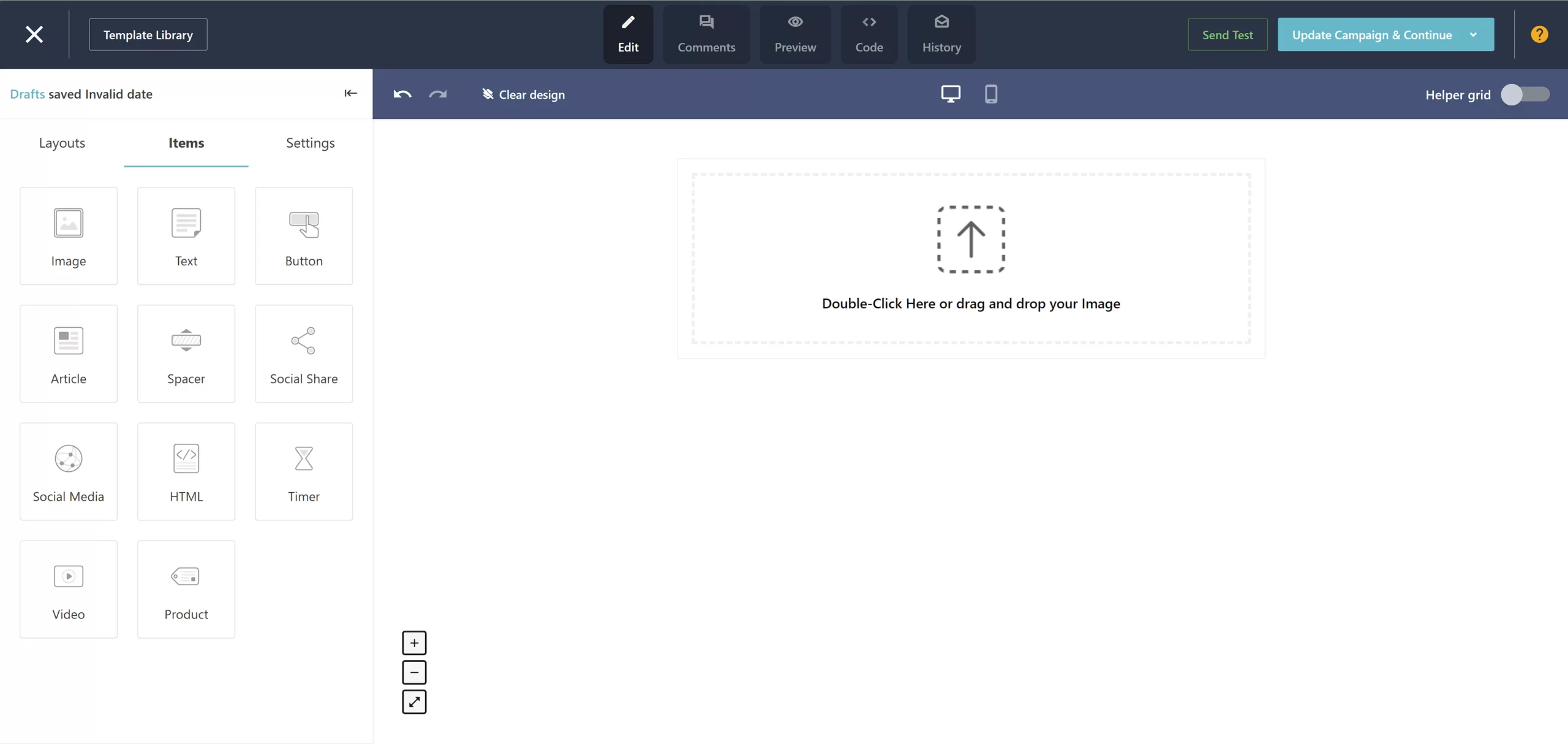
Creating engaging and professional-looking emails is crucial for any email marketing campaign, and Moosend’s Drag & Drop Email Editor is designed to make this process as smooth as possible. Here’s a deeper look at how this feature stands out:
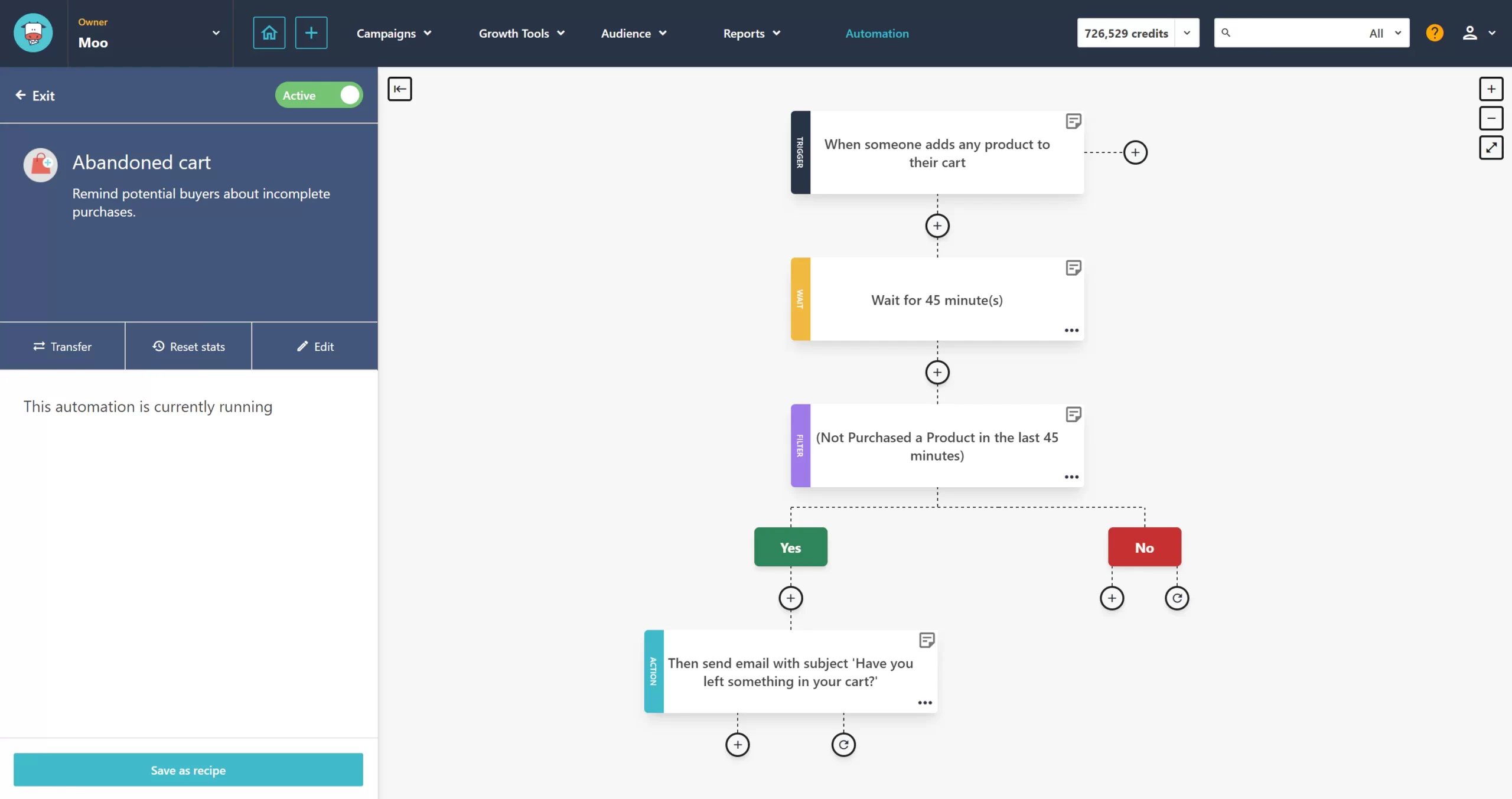
Automation is the powerhouse behind any successful email marketing strategy, and Moosend’s Email Marketing Automation feature is designed to streamline your campaigns and make them more effective.
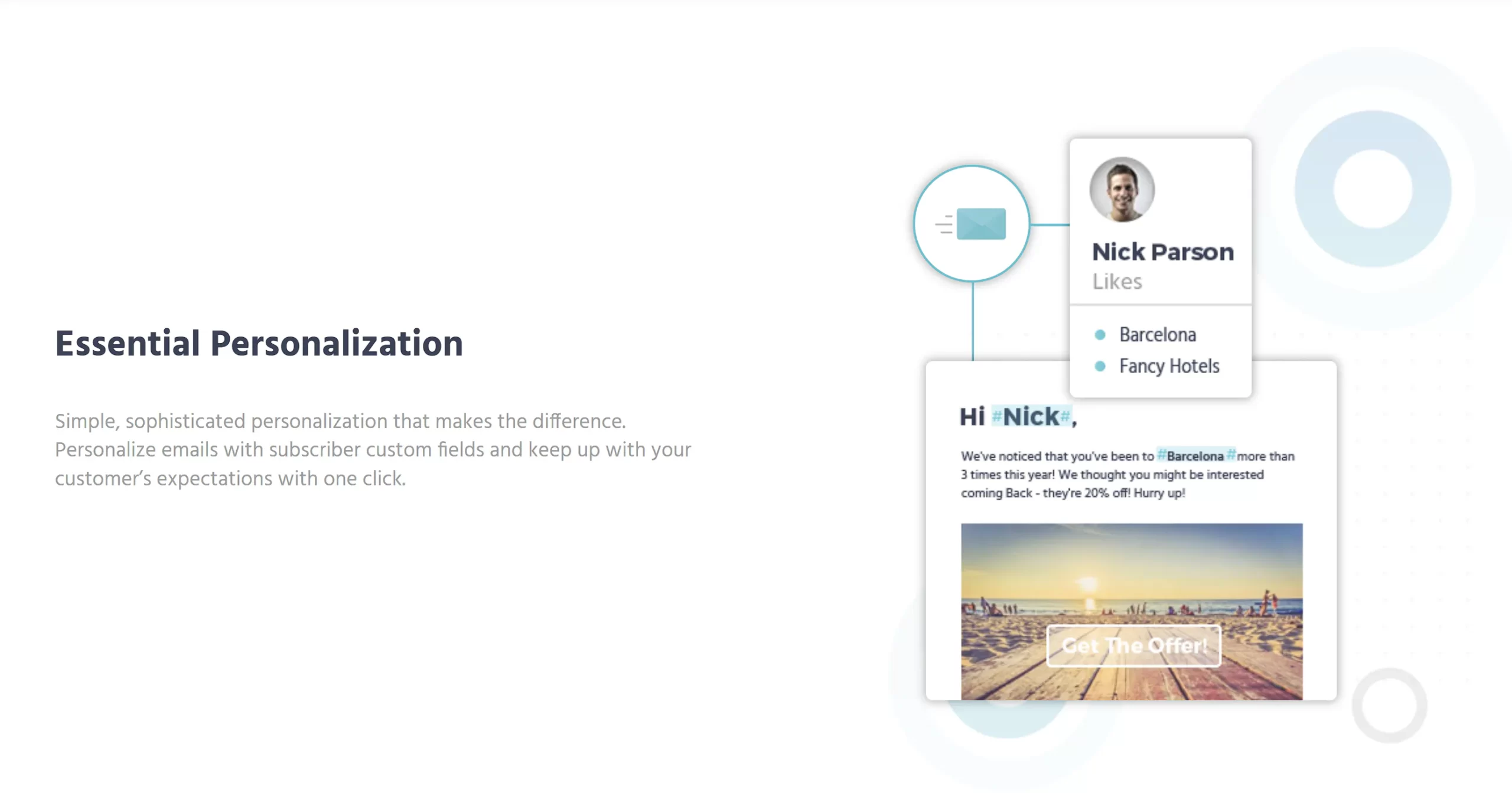
Moosend’s personalization capabilities take email marketing to a new level by allowing businesses to tailor their messaging to each individual subscriber, creating a more intimate and effective communication strategy.
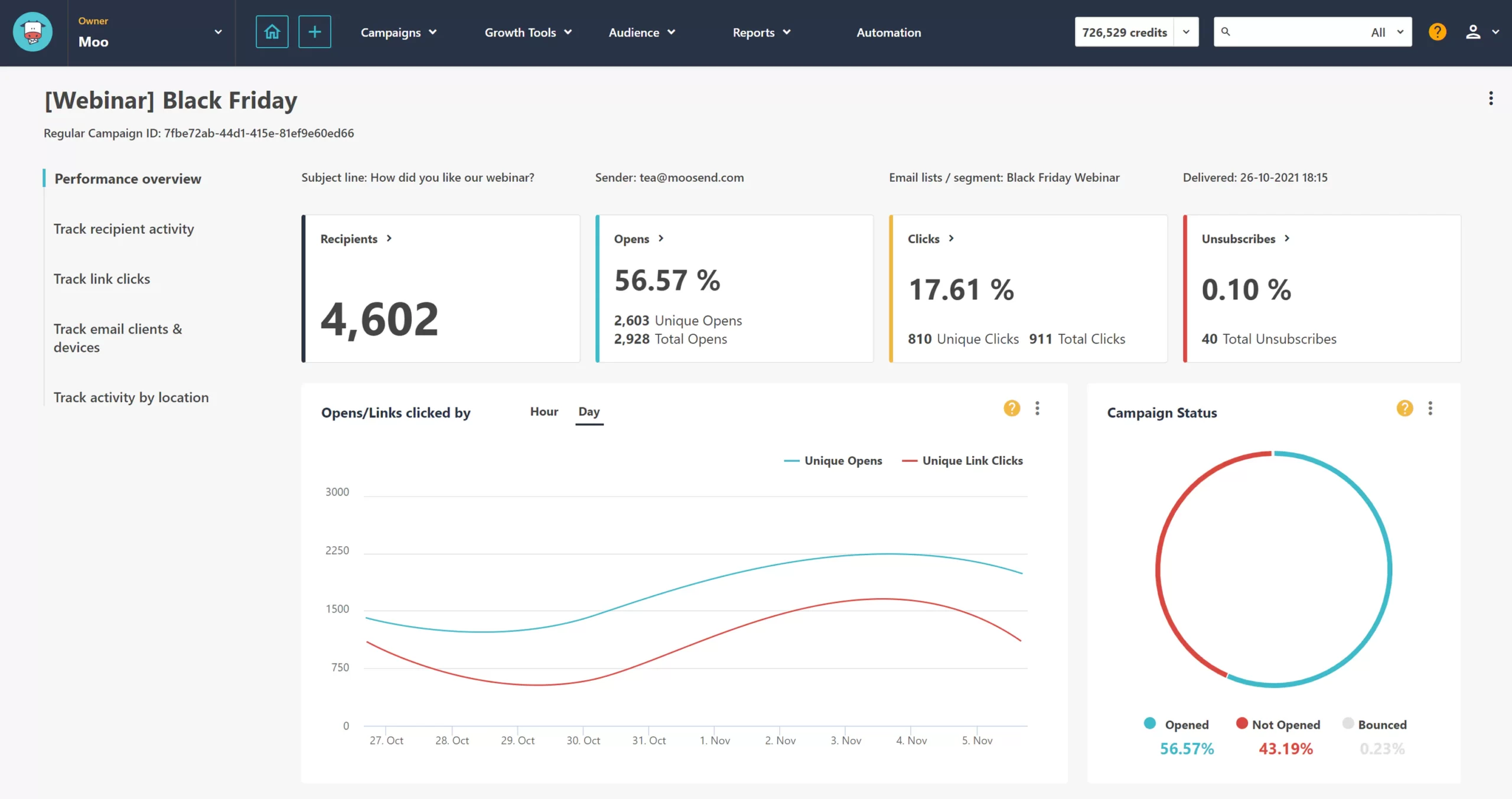
Moosend’s analytics go beyond opens and clicks, offering a granular view of campaign performance. Track everything from user engagement to conversion rates, and understand not just how many, but also how users interact with your emails.
With Moosend’s reporting tools, you can identify which parts of your email campaign are working and which need improvement. Use A/B testing results to inform your decisions and optimize your campaigns for better performance.
Get up-to-the-minute data on your email campaigns, allowing you to react quickly to trends or issues as they arise. This real-time information can be crucial for time-sensitive campaigns or offers.
Moosend campaigns can be tracked with Google Analytics, allowing for a seamless integration that provides deeper insights into link clicks and conversions from your email campaigns. This feature is easily configurable for both new and existing campaigns, ensuring that you can leverage the full power of Google Analytics alongside Moosend’s native reporting tools.
Create custom reports that focus on the metrics that matter most to your business. Whether it’s click-through rates for a specific call-to-action or the performance of a new email template, Moosend lets you tailor it to your analytical needs.
Easily export your data for further analysis or to share with team members. Moosend supports various formats, ensuring you can work with your data in the way that suits you best.
Keep a close eye on your subscriber list’s growth and churn rates. Moosend provides insights into subscriber behavior, helping you to refine your acquisition and retention strategies.
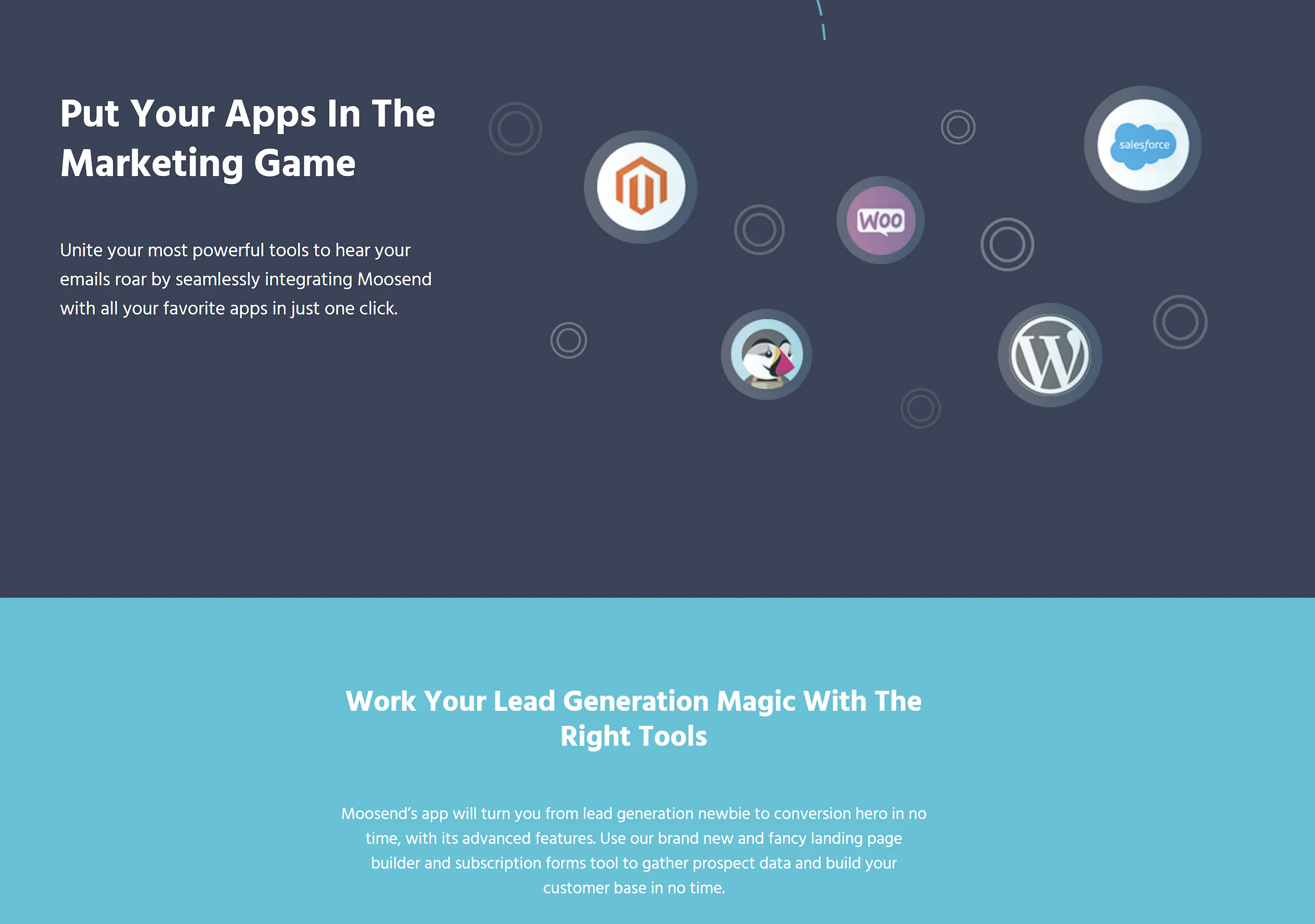
Moosend’s platform can integrate with a wide array of popular services and applications, facilitating a more streamlined workflow. This allows for the automatic transfer of data between Moosend and other tools your business may use.
With one-click integrations, Moosend connects to e-commerce platforms, CRM systems, and other marketing tools, enabling you to synchronize data and automate processes across your business ecosystem.
For more customized solutions, Moosend offers API access that allows developers to build custom integrations. This ensures that Moosend can fit into any tech stack, adapting to your specific business needs.
Explore Moosend’s library of plugins to find additional functionalities that can enhance your email marketing efforts. From advanced analytics to deeper personalization, the right plugin can significantly extend Moosend’s capabilities.
Connect Moosend to thousands of other apps through Zapier, creating automated workflows that can save time and eliminate the need for manual data entry.
| Active Campaign |  | Intercom |  | QuickEmailVerification |  |
| Agile CRM |  | Involve.me |  | Recurly |  |
| APIXDrive |  | Jet form builder |  | Salesflare |  |
| Benchmark |  | KonnectzIT |  | Salesforce |  |
| BigMarker |  | Magento |  | Sendgrid |  |
| Bouncer |  | MailChimp |  | Sendinblue |  |
| Campaign Monitor |  | MailChimp Synchronizer | | SharpSpring |  |
| Clearout |  | MailerLite |  | Socital |  |
| ConstantContact |  | Mailoptin |  | Sugar CRM |  |
| Contactually |  | MailUp |  | ThriveCart |  |
| Continually |  | Maître |  | Unbounce |  |
| Convertbox |  | Make |  | Verifybee |  |
| Convertful |  | Marketo |  | Vtiger |  |
| Copper |  | Microsoft Dynamics CRM |  | Wishpond |  |
| CS-Cart |  | Moosend API |  | WooCommerce |  |
| DotDigital |  | Moosend’s SMTP Server | | WordPress Subscription Form |  |
| Drupal |  | MS Exchange |  | Xero |  |
| Elementor |  | MyEmma |  | Zapier |  |
| EmailHeatmaps |  | Neverbounce |  | Zen Cart |  |
| Eventbrite |  | Ontraport |  | Zendesk |  |
| Facebook Lead Ads |  | OpenCart |  | Zoho CRM |  |
| Freshbooks |  | Optiin |  | ||
| GetResponse |  | OptiMonk |  | ||
| Google Contacts |  | Optingun |  | ||
| HubSpot |  | Pabbly |  | ||
| Hyperise |  | Paperform |  | ||
| Influence |  | Personizely |  | ||
| Infusionsoft by Keap |  | Pipedrive |  | ||
| Insightly |  | Podio |  |

Moosend includes a landing page builder that allows users to create attractive and high-converting landing pages without any coding knowledge. This tool is equipped with a variety of templates and customization options to suit different styles and campaign goals.
The platform provides a range of customizable subscription form templates that can be embedded on websites, blogs, or social media to help grow your mailing list. These forms are designed to capture visitor information in a non-intrusive way, contributing to lead generation efforts.
To capture leads more aggressively, Moosend offers pop-ups and floating bars that can be added to your website. These tools can be triggered based on user behavior, such as when they’re about to leave the site, to maximize the chance of conversion.
You can use advanced form fields to collect more than just basic contact information. This includes dropdowns, checkboxes, and radio buttons, allowing for the collection of detailed subscriber preferences and data.
Test different versions of your forms to see which one performs better in terms of conversion rates. Moosend’s A/B testing feature can provide valuable insights into what resonates best with your audience.
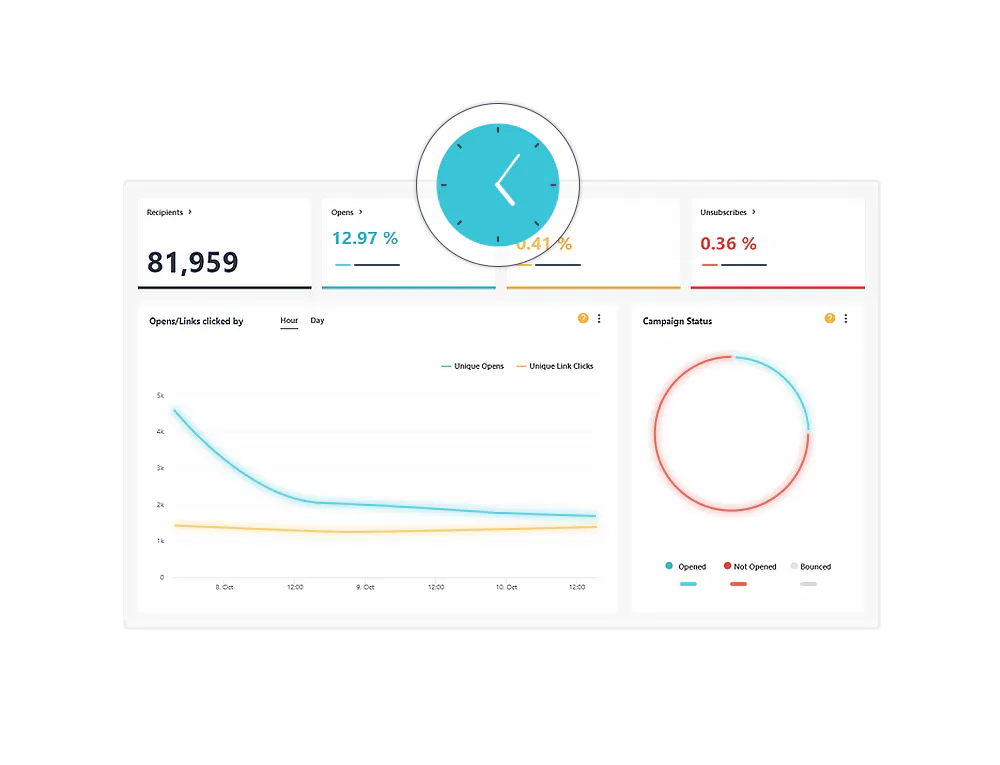
Moosend’s real-time tracking allows you to monitor the performance of your email campaigns as they unfold. This feature provides instant feedback on key metrics like open rates, click-through rates, and unsubscribe rates, enabling you to gauge the immediate impact of your emails.
Track how subscribers are interacting with your emails, including which links are getting the most clicks and how long people are spending reading your emails. This information can help you understand what content captures your audience’s interest.
Understand where in the world your emails are being opened with geo-tracking features. This geographic data can inform you about where your audience is located, allowing for more targeted and region-specific campaigns.
See which devices your subscribers are using to open your emails, whether it’s desktop computers, tablets, or smartphones. This can help ensure that your email design is optimized for the most commonly used devices.
The click map tool provides a visual representation of where subscribers are clicking within your emails. This can highlight which parts of your email design are most effective at driving engagement and which may need to be rethought.
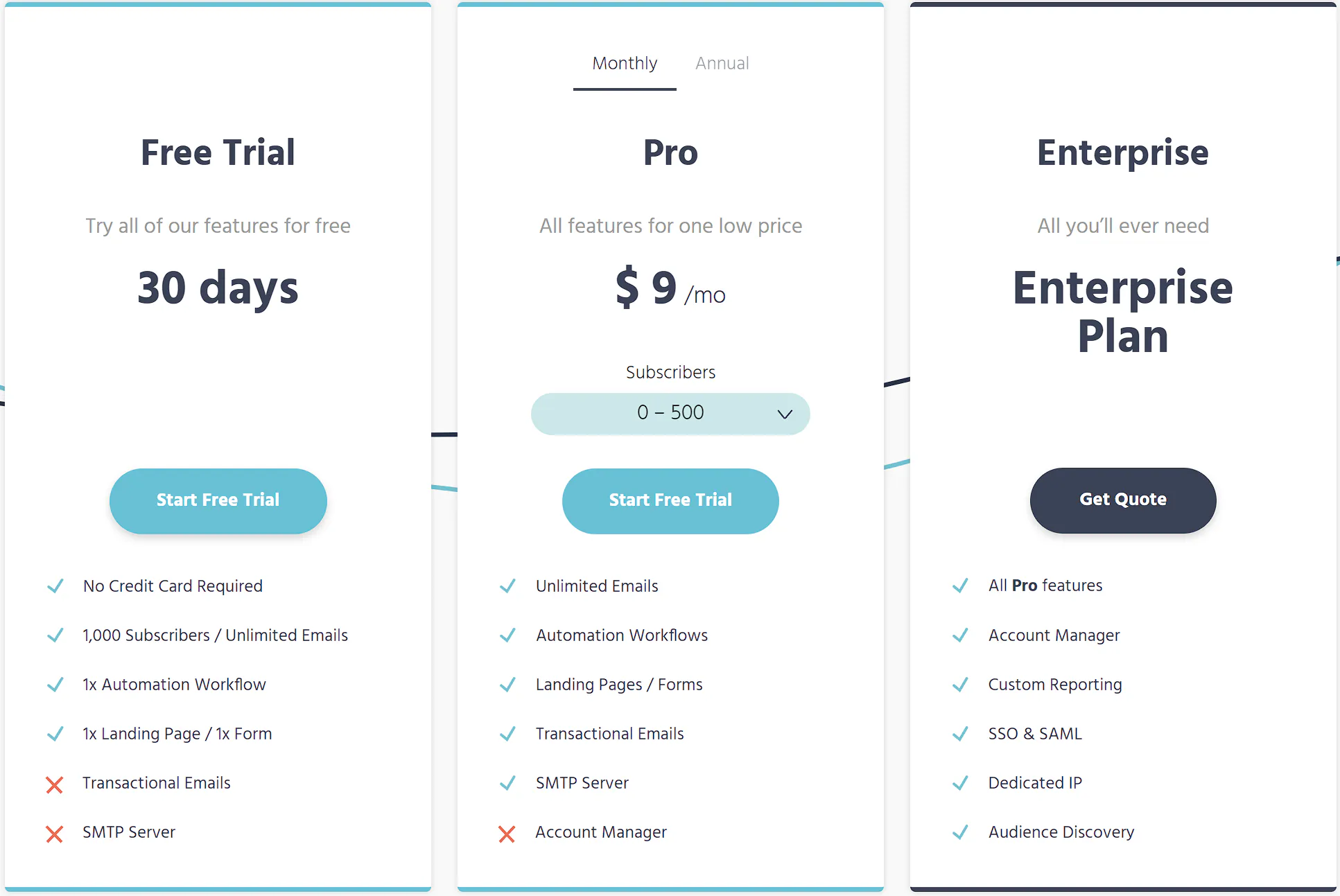
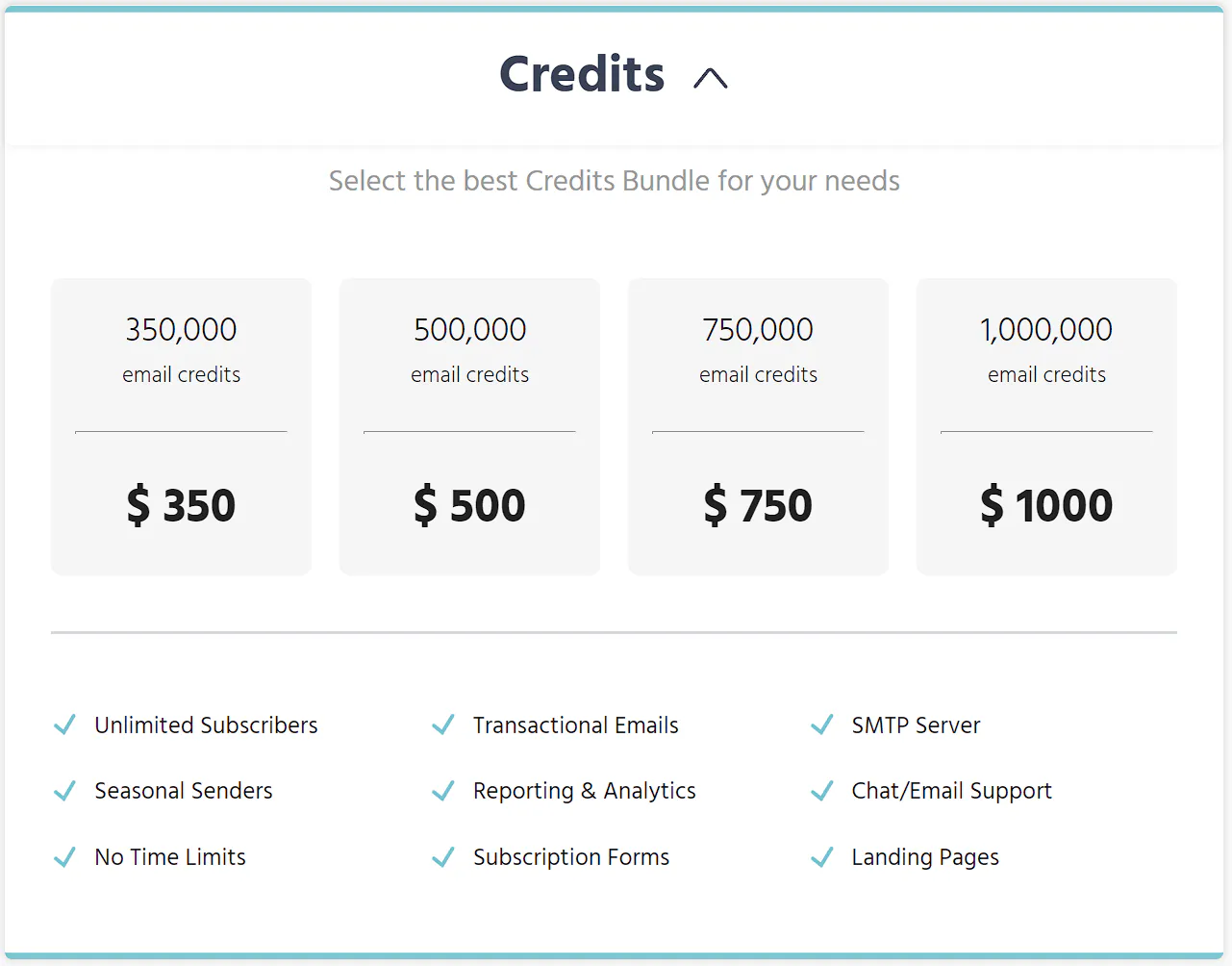
Moosend’s pricing plans are designed to accommodate businesses of all sizes, from solo entrepreneurs to large enterprises. Understanding how their pricing structure works can help you decide which plan is the best fit for your email marketing needs.
Moosend uses a tiered pricing model, which means the cost scales with the number of subscribers you have. This model allows you to start small and upgrade as your mailing list grows, ensuring you only pay for what you need.
The free plan offers a robust set of features, making it an attractive option for those just starting out or with a small list of subscribers. It includes access to the core email marketing and automation features, with some limitations on the number of emails you can send.
Paid plans unlock additional features, such as landing pages and priority support. They also typically offer a higher or unlimited number of emails per month and more advanced reporting and analytics tools.
For businesses with irregular email sending needs, Moosend offers a pay-as-you-go option. This can be more cost-effective than a monthly subscription if you send emails less frequently.
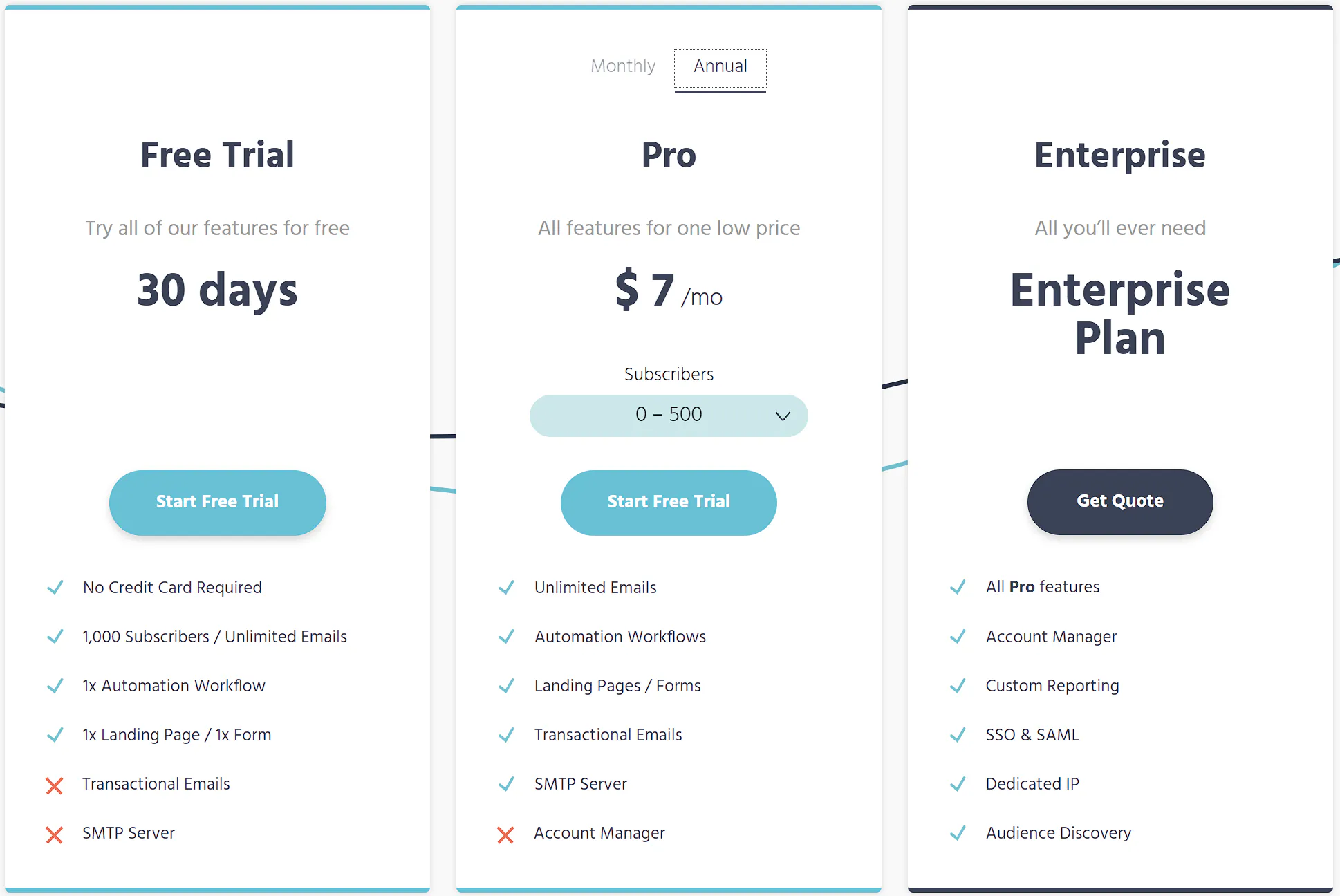
Moosend provides discounts for users who commit to an annual subscription. This can be a significant saving over the month-to-month pricing and is worth considering if you’re planning to use the service long-term.
Moosend is known for its transparent pricing with no hidden fees. However, it’s always a good idea to read the fine print and understand exactly what’s included in each plan to avoid any surprises.
When considering Moosend for your email marketing needs, one of the key decisions is whether to opt for the free plan or invest in a paid subscription. Here’s how to assess the value of each option:
Moosend’s dashboard design is intuitive, allowing new users to quickly find their way around the platform. The layout is clean and user-friendly, with key functions like campaign creation, list management, and analytics readily accessible.
The process of setting up new email campaigns in Moosend is streamlined to ensure efficiency. Users can start a campaign with a few clicks, and the step-by-step guide helps to manage the process without confusion.
Moosend offers a high degree of customization within its interface, enabling users to tailor the experience to their preferences. This includes customizable dashboards and the ability to create unique workflow views.
For those who need guidance, Moosend provides a comprehensive knowledge base, tutorials, and responsive customer support. This ensures that users can learn to use the platform effectively and troubleshoot any issues that arise.
Moosend has a track record of incorporating user feedback into its interface and feature set. The platform regularly updates and improves based on what users find helpful or necessary for their email marketing efforts.
The platform is designed to be accessible to users with varying levels of expertise, from beginners to advanced marketers. Moosend’s interface avoids technical jargon and presents information in a straightforward manner, making it inclusive for all users.
Moosend’s user interface and overall user experience are central to its appeal. The platform provides a balance of depth in functionality with simplicity in design, ensuring that users can focus on creating and managing their email campaigns without being overwhelmed by complexity.
Moosend is an email marketing automation platform that allows users to design and send email campaigns, automate marketing processes, and track the performance of their emails.
Moosend offers a Free Trial, a Pro Plan, and an Enterprise Plan. The Pro Plan’s pricing varies based on the number of subscribers, starting from 0-500 and scaling up to over 1,000,000 subscribers.
Yes, Moosend offers a free trial that includes access to all features, allowing users to test the platform before upgrading to a paid plan.
Moosend offers robust automation features, including pre-designed workflows for various campaigns such as reminders, onboarding, cart abandonment, and more, which can be customized to fit specific marketing needs.
Moosend allows for essential personalization using subscriber custom fields, product recommendations based on past purchases, and hyper-personalization with artificial intelligence to suggest products based on similar customer preferences.
Moosend provides in-depth analytics and reporting features that give insights into campaign performance, including opens, clicks, social shares, and unsubscribes, which can be used to optimize future campaigns.
Yes, Moosend can be integrated with a variety of other apps and services to streamline marketing efforts and enhance functionality.
Moosend is considered user-friendly and suitable for beginners, thanks to its intuitive interface and straightforward campaign creation process.